TorizonCore Builder Overview
Introduction
TorizonCore Builder is a command-line tool that simplifies the process of generating production-ready, customized Torizon OS images.
After building your custom image, you can:
- Flash it manually using the Toradex Easy Installer.
- Deploy it directly to the SoM over SSH.
- Push it remotely to Torizon Cloud for OTA deployment.
Supported features
TorizonCore Builder supports the following features:
- Hardware and I/O support:
- Apply device tree overlays: Enable and configure hardware peripherals such as GPIOs, I2C, SPI and display interfaces.
- Change pin functions (multiplexing)
- Build kernel modules: Extend the OS functionality, for example, by enabling custom drivers.
- Kernel and boot-time configuration:
- Customize kernel arguments: Control kernel behavior, logging and more.
- Boot experience:
- Change the system splash screen: Personalize the boot screen.
- Deployment and development workflow:
- Pre-provision Docker container images: Boot your device with preloaded containers on the first boot, without needing to pull them from the internet. Ideal for production.
- Capture device configuration: Preserve configuration changes made to a target device at runtime during development, and embed them into your final OS image.
- Use Visual Studio Code integration: Develop, customize, and deploy TorizonCore Builder projects directly from VS Code.
Unsupported Use Cases
TorizonCore Builder does not support the following customizations:
- Modifying the kernel source code
- Adding in-tree kernel modules
- Customizing the bootloader (U-Boot)
- Changing the initramfs (initial RAM filesystem)
Use the Yocto Project to implement these kinds of custom changes.
If you want to add a kernel module that is already available in the kernel source (in-tree), make a request in our community. If it does not negatively impact Torizon OS, we may include it as a module.
Supported Hardware
The support level of TorizonCore Builder can vary depending on the hardware the Torizon OS image targets.
All Toradex hardware that is supported on Torizon OS is also fully supported by TorizonCore Builder in most cases. The only cases in which this is not true are the following:
- Luna SL1680 SBC: TorizonCore Builder support for this hardware is under development.
- Secure Boot related commands: TorizonCore Builder commands that relate to Secure Boot have differing levels of support based on hardware and command. Please refer to the article Secure Boot on Torizon OS for more details.
Torizon OS is also available on non-Toradex hardware. TorizonCore Builder support on these can be summarized with the following table:
- ✅ feature is supported
- ❌ feature is not supported
- ⌛ feature is under (or scheduled for) development
| Non-Toradex Hardware → Feature ↓ | NXP | TI | Synaptics | NVIDIA | x86_64 |
|---|---|---|---|---|---|
| Creating container bundle | ✅ | ✅ | ✅ | ✅ | ✅ |
| Pre-provisioning container images | ✅ | ✅ | ⌛ | ✅ | ✅ |
| Deploy output OS image | ✅ | ✅ | ⌛ | ✅ | ✅ |
| Customize device tree | ⌛ | ⌛ | ⌛ | ⌛ | ⌛ |
| Customize device tree overlays | ⌛ | ⌛ | ⌛ | ⌛ | ⌛ |
| Auto-provision to Torizon Cloud | ⌛ | ⌛ | ⌛ | ⌛ | ⌛ |
| Capture device configuration | ✅ | ✅ | ⌛ | ✅ | ✅ |
| Adding kernel modules | ⌛ | ⌛ | ⌛ | ⌛ | ⌛ |
| Customizing kernel command line arguments | ⌛ | ⌛ | ⌛ | ⌛ | ⌛ |
| Secure boot related features | ❌ | ❌ | ❌ | ❌ | ❌ |
| Customizing splash screen | ✅ | ✅ | ⌛ | ✅ | ✅ |
The features available through the platform command interact with Torizon Cloud and therefore do not depend on the target hardware.
The only exception is the ability to push an OS image to Torizon Cloud. Support for this operation follows the same hardware compatibility rules as OS image deployment. If a generated OS image can be deployed to a given hardware platform, it can also be pushed to Torizon Cloud for that platform.
All other platform command features are supported across all hardware platforms that run Torizon OS.
Workflow
The diagram below illustrates the role of TorizonCore Builder in a typical Torizon OS development workflow:
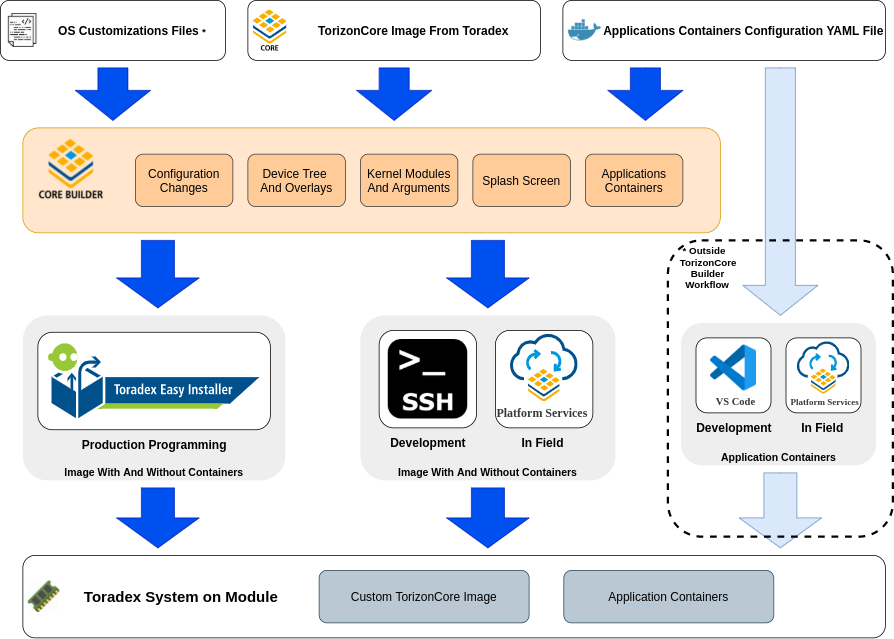
A typical workflow consists of the following steps:
- Install TorizonCore Builder.
- Download a base OS image.
- Customize the image (e.g., splash screen, device tree, containers, kernel arguments).
- Deploy your custom image to the target device.
Build Options
TorizonCore Builder tool provides two approaches to customize Torizon OS images:
- Using The Build Command
- Using Standalone Commands
The build command reads all the customizations specified in a YAML configuration file and applies them in a single step. This method is simpler and more reproducible.
Multiple changes—such as adding a kernel module, custom device tree, and overlays—are just entries in the configuration file.
The build command is stateless and always produces the same output for the same inputs, making it ideal for production and automation environments.
In contrast, standalone commands depend on previous states and may produce different results depending on execution order—for example, applying and then removing a device tree overlay differs from removing and then applying it.
However, each build runs a complete pipeline: unpacking the base image, applying all modifications, and generating a new image. For incremental changes, the process can become slow and inconvenient over time.
The second approach, using standalone commands, avoids running the full pipeline every time. This is useful during development when applying iterative tweaks like a new splash screen or overlay. You can simply add a new change to an already customized image, then run the merge and deploy commands to easily update your Torizon OS image.
Using the build Command
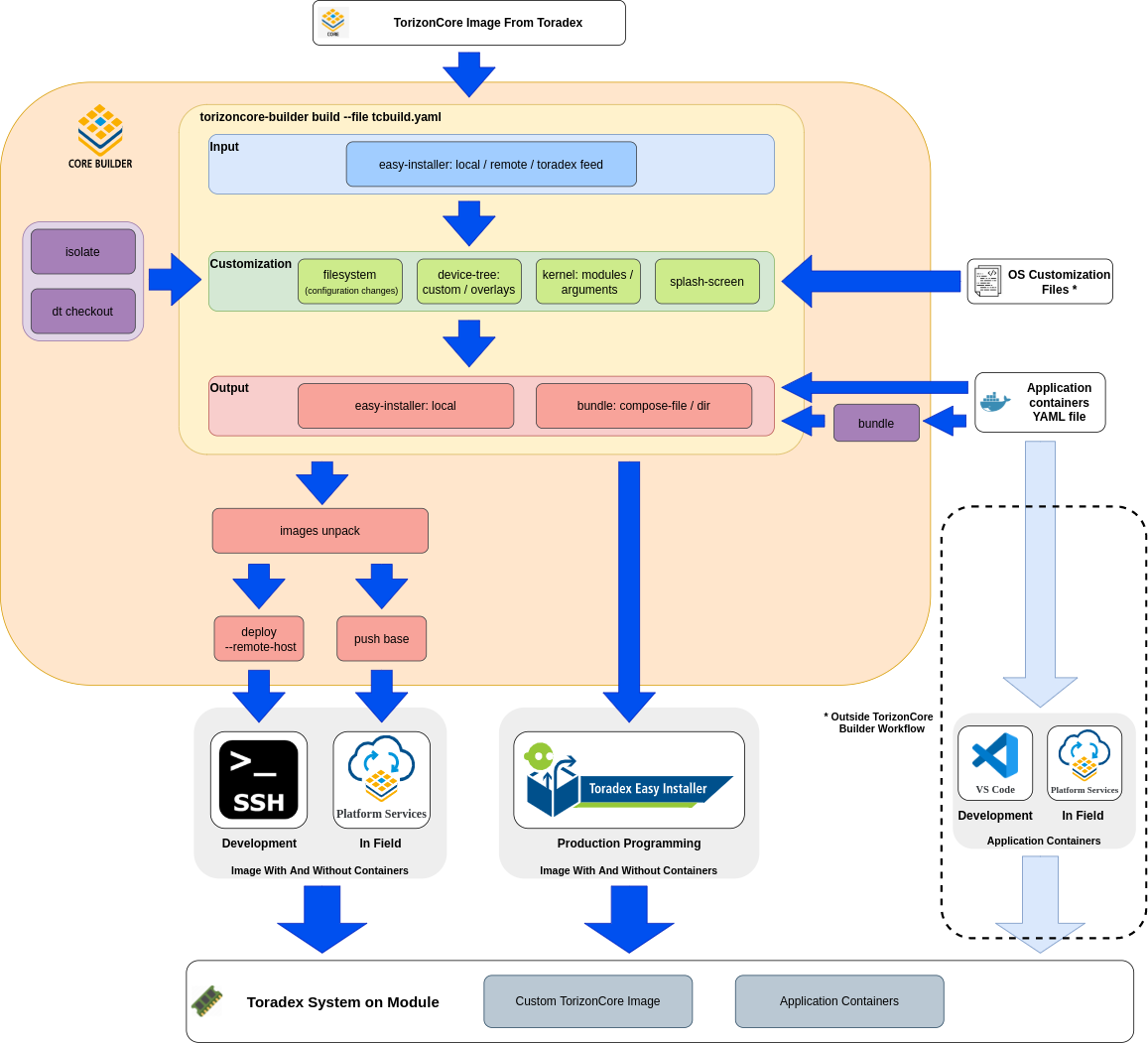
- Create a configuration file with the desired settings (the
buildcommand can even help you with that); - Run the auxiliary commands where needed, so all local artifacts possibly referenced by the configuration file are available. Also, depending on the input method, download a Torizon Easy Installer image from Toradex;
- Customize the configuration file to select the desired input image, include the desired customization, and get the desired outputs;
- Run the
buildcommand; - Deploy the output image to the board or to the Torizon Cloud server.
Using the Standalone Commands
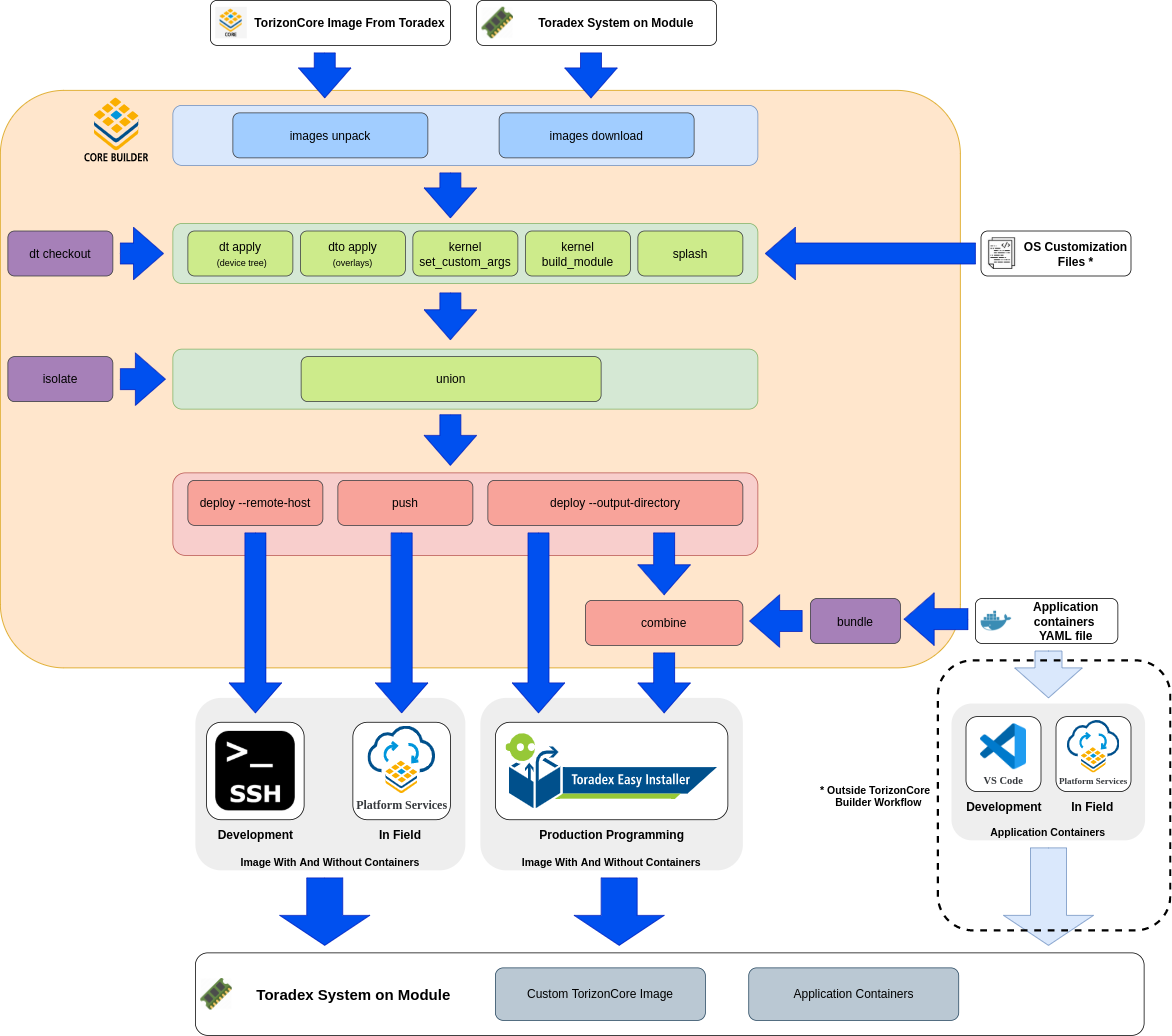
- Download a Torizon Easy Installer image from Toradex;
- Unpack the downloaded image;
- Run the auxiliary commands where needed, so all local artifacts possibly referenced by the configuration file are available;
- Apply the desired customizations in the unpacked image;
- Merge the new customizations;
- Deploy the output image without containers locally and combine it with the container images;
- Deploy the output image to the board or to the Torizon Cloud server.
Documentation Summary
- Install TorizonCore Builder: Install the tool on Linux or Windows host machines.
- Customize Torizon OS Images: Learn the process from downloading a Torizon OS base image to building and deploying your custom image.
- Configuration File: A walkthrough of the configuration file used by TorizonCore Builder to customize images. Learn what you can customize, such as kernel arguments, device tree overlays, kernel modules and more.
- Customization Examples: Examples for different use cases, such as changing the OS splash screen, building kernel modules, provisioning containers and more.
- Commands Manual: A manual for all available TorizonCore Builder commands.
- Visual Studio Code Integration: How to leverage Visual Studio Code tasks to streamline OS customization.
- In-Depth Use Cases: A set of articles that cover the supported use cases in depth, such as pin multiplexing, capturing changes, pre-provisioning Docker containers, etc.