BSP Layers and Reference Images for Yocto Project - Overview
Introduction
Linux, developed as an open source operating system for IBM computers, was ported to Arm in the early days. Today, Linux holds a significant market share in the embedded world, mainly on Arm devices. The advantages over proprietary embedded operating systems include no royalties or licensing fees, a stable kernel, a vast number of tested drivers, a support base that is not restricted to the employees of a single software company, and the ability to modify and redistribute the source code.
Toradex provides embedded Linux BSPs (Board Support Packages) and reference images for all our current computer on modules. Those BSPs are provided by an in-house development team working side-by-side with the hardware team. This enables us to provide a high-quality Linux port. When it comes to solving issues, the customer can rest assured that they will not be the play ball between different hardware and software providers.
Embedded Linux Offerings
Toradex provides three options for embedded Linux development. Our main website presents the offerings, and our developer website has pages used as entry point for related technical articles:
- Torizon OS / Overview on the Torizon website
- Torizon OS Reference Images for Yocto Project / Overview on the main website
- Toradex BSP Layers and Reference Images for Yocto Project / Overview on the main website
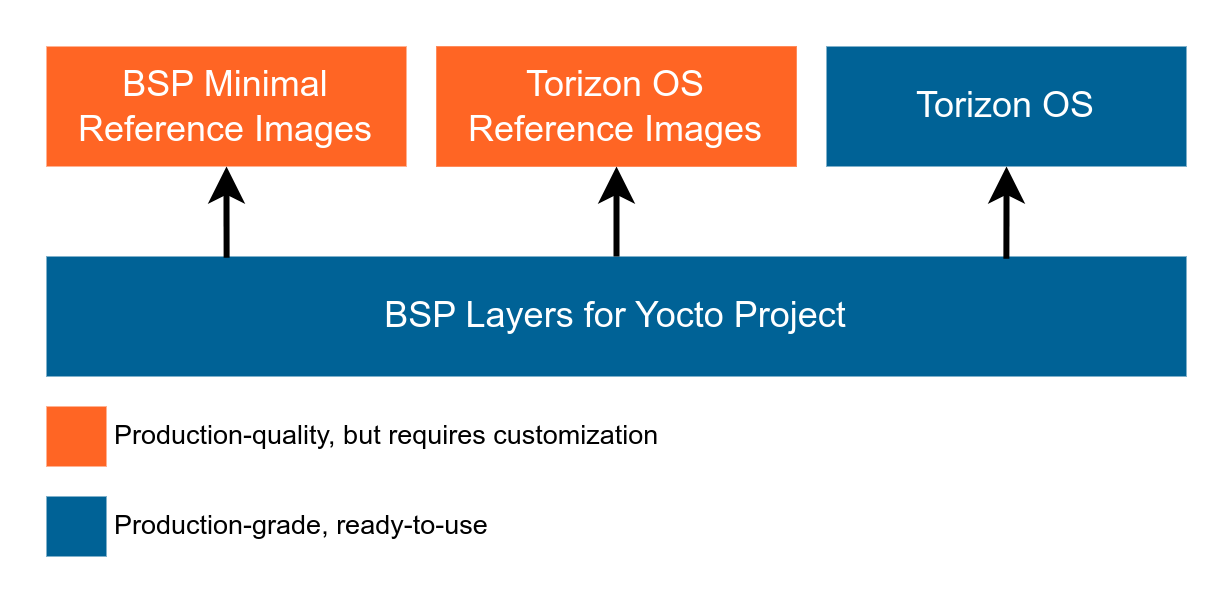
While Torizon OS (both the ready-to-use and the Reference Minimal Images) and the BSP Reference Images are built on top of the BSP layers, they have fundamental differences. Learn more about them in our Embedded Linux page on the main Toradex website.
This page focuses on the Toradex BSP Layers and Reference Images for Yocto Project. For Torizon, please refer to the Torizon software page.
To learn more about our Linux Options, read our dedicated page:
The Yocto Project and OpenEmbedded
The Yocto Project is an open source collaboration project that provides tools, templates, and practices for creating custom Linux-based systems. OpenEmbedded is the build framework used by the Yocto Project to create kernels, root filesystems, and packages from source code. The projects co-maintain the build system, and Toradex documentation may use both names when discussing it. Search the documentation for both terms when researching a topic.
Toradex is a Yocto Project participant and builds its BSP Layers and Reference Images on this infrastructure. Relevant Yocto Project components include:
- OpenEmbedded Core (OE-Core): Core metadata and recipes used to build a distribution.
- BitBake: The task executor that parses metadata and builds packages and filesystem images from source.
- CROPS: Container images and tooling for build environments.
See the Yocto Project components and tools overview for the complete project scope.
Toradex provides and supports Embedded Linux BSPs based on the Yocto Project and OpenEmbedded. We maintain production-quality OpenEmbedded BSP and reference distribution layers as a starting point for custom embedded Linux systems.
Toradex BSPs use OE-Core recipes and BitBake. Toradex also uses AutoBuilder and CROPS internally for some BSP builds.
For the layer boundaries and the relationship between the BSP, distribution, and images, refer to BSP Layers and Reference Images Architecture.
BSP Layers and Reference Images for Yocto Project
Toradex provides Linux support through BSP Layers and Reference Images for Yocto Project.
They are:
- A fast and reliable starting point for you to create your own distribution.
- Production-grade quality.
They are not:
- Feature-complete nor ready to be used in a production environment without further customization.
BSP Layers for Yocto Project
The BSP layers for Yocto Project provide production-grade building blocks for creating custom Linux images with minimal hardware bring-up effort.
Reference Images for Yocto Project
The Reference Images for Yocto Project are boot-ready images used to test and validate the Toradex BSP. They include a broad set of hardware interfaces and software components for verifying board-level functionality and integration. You can use these images to validate your Yocto build environment or as a starting point for developing a custom production image. Similar to Poky, the Yocto Project reference distribution, they provide a reference implementation on which to build.
For production deployments, Toradex recommends creating a distribution and image tailored to your specific requirements.
Ready-to-Install Images
Toradex provides pre-built binaries of its Reference Images for Yocto Project to simplify initial evaluation and hardware bring-up. These binaries are intended for evaluation only.
We don't maintain or provide SDKs for the reference image. You must build your own Linux SDKs using OpenEmbedded.
If you want a simpler build setup and faster time to market, consider starting with Torizon. Torizon provides a production-ready Linux platform that supports most application and system customization through containers and configuration, without requiring a Yocto build.
Torizon is a good fit when:
- Your application does not require drivers or other components distributed as Yocto layers.
- You do not already depend on a Yocto-based development workflow or CI infrastructure.
- You do not need to build around existing in-house Yocto expertise.
Learn more about the differences between the Reference Images for Yocto Project and Torizon and consider starting with Torizon.
How to Build a Yocto / OpenEmbedded Image
The comprehensive Toradex guides to building a Yocto/OpenEmbedded embedded Linux image are:
- Build a Reference Image with Yocto Project for building from our Reference Images for Yocto Project.
- Custom meta layers, recipes and images in Yocto Project (hello-world examples) for integrating your application.
- Build Torizon OS With Yocto for building Torizon OS.
A summary of the steps to follow from configuration to deployment is provided below. Please see the technical articles above for the actual commands and exact steps you have to execute:
- Install the prerequisites. Make sure you install and configure git, and that proxy/firewall does not block access to any required URL.
- Download the required repositories using the Repo tool.
- Export the environment setup script.
- Setup your machine, which tells OpenEmbedded for which Toradex computer on module you are building.
- Use bitbake to build the image. This takes a lot of time during the first build. For later builds, only the packages you customize will be re-built which makes it much faster.
- Deploy the resulting image to the computer on module.
You can also build U-Boot and Linux Kernel from source without Yocto setup.
For further information about what Linux kernel and U-Boot branch are valid for which module hardware refers to the Build U-Boot and Linux Kernel from Source Code article.
Customization
You will need to customize our Reference Images for Yocto Project to make them match your application and custom hardware requirements.
We provide documentation about reproducing our pre-built images with Yocto, and how to build the U-Boot and Linux kernel directly from the source code. If you need help customizing or integrating a BSP, we provide professional support!
Versions
See Toradex BSP versions and their information on the following table. There might be several concurrent Toradex BSP versions available at a given point in time, refer to Toradex Embedded Linux Support Strategy. The Embedded Linux Release Matrix summarizes versions of Yocto/OpenEmbedded, the Linux kernel and U-Boot, and release dates for Toradex Embedded Linux releases.
| Toradex Version | Status | Distribution | OpenEmbedded/Yocto Project Codename | Yocto Project Release |
|---|---|---|---|---|
| 8.0 | Latest | Poky based | wrynose | 6.0 LTS |
| 7.0 | Maintained | Poky based | scarthgap | 5.0 LTS |
| 6.0 | Outdated | Poky based | kirkstone | 4.0 LTS |
| 5.7 | Outdated | Poky based | dunfell | 3.1 LTS |
| 4.0.0 (deferred*) | Deferred | Poky based | zeus | 3.0 |
| 3.0 | Outdated | Poky based | thud | 2.6 |
| 2.8 | Outdated | Ångström v2017.12 | rocko | 2.4 |
| 2.7 | Outdated | Ångström v2016.12 | morty | 2.2 |
| 2.6 / 2.6.1 | Outdated | Ångström v2015.12 | jethro | 2.0 |
| 2.5 | Outdated | Ångström v2015.06 | fido | 1.8 |
| 2.4 | Outdated | Ångström v2014.12 | dizzy | 1.7 |
| 2.3 | Outdated | Ångström v2014.06 | daisy | 1.6 |
| 2.2 | Outdated | Ångström v2013.12 | dora | 1.5 |
| 2.1 | Outdated | Ångström v2013.06 | dylan | 1.4 |
* 4.0.0 is deferred, learn more on https://www.toradex.cn/blog/torizon-yocto-project-long-term-support-alignment
Releases
Toradex defines a release cycle for the BSP Layers, Reference Images for Yocto Project and Torizon OS.
Release and Support Strategy
To learn more about them and determine which one is right for you, read our Support Strategy:
Release Notes
Concise, high-level release notes are published on the News section of toradex.cn:
Comprehensive, detailed release notes are maintained on the following pages on the developer website:
Source Code
The Linux kernel and U-Boot bootloader source code as well as the Toradex OpenEmbedded layers can be cloned from our GIT server. Sources of our current Linux images are available at git.toradex.cn:
- Linux kernel: https://git.toradex.cn/cgit/linux-toradex.git/
- U-Boot: https://git.toradex.cn/cgit/u-boot-toradex.git/
- OpenEmbedded repo manifest: repo toradex-manifest
Check out the versions of U-Boot, kernel and Yocto/OpenEmbedded in our Embedded Linux Release Matrix.
Pre-built Images
The pre-built binary images are provided by Toradex for your convenience and ease-of-use during your first steps with Toradex hardware.
Download Links for Offline Installation
Download pre-built images from the Reference Images for Yocto Project Software Downloads.
Flashing an Image
First, check under which category you fall:
- If your module has come straight from factory and you have never installed anything in it, it will have the Toradex Easy Installer pre-installed. You just need to power it on.
- Otherwise, you must load the Toradex Easy Installer on your module's RAM memory.
Use the Toradex Easy Installer to flash the image into the Computer on Module.
Next Steps
Use the pre-built Reference Images to evaluate your hardware and validate your setup. To develop a product, build and customize an image for your requirements, then complete the production-specific integration and validation steps.
Evaluate and Set Up
- Quick Reference for the core Linux, BSP, and Yocto Project terms used throughout this documentation
- Review the BSP Layers and Reference Images Architecture
- Set Up a Host Machine for Yocto Project Builds
Build and Customize an Image
- Build a Reference Image with Yocto Project
- Create Custom Layers, Recipes, and Images
- Configure Device Tree Overlays
Prepare Your Custom Image for Production
- Maintain Open-Source License Compliance
- Integrate the Production-Hardening and Security Best-Practices
- Prepare Your Image for Production Programming
Additional Resources
External Documentation
Partners
Toradex has a Blog and Webinars pages where you can find content related to Yocto, aimed to help your embedded Linux development with Yocto Project. Check periodically for most up-to-date articles and if you would like to read a blog post that is not yet written, leave your feedback using the Feedback developer website button.
Blogs
- The Yocto Project's Reference Distribution “Poky" on Toradex Hardware
- Cloud-Aided Yocto Build Speedup
- Patching Kernel in OpenEmbedded
- Building Custom Embedded Linux Distributions
- Embedded Linux Boot Time Optimization
Webinars
- How to add OTA Updates and other IoT features to your Yocto image
- Getting Started with Yocto: Meeting the challenge of Embedded Linux deployment
- Part 1: Introduction - Building Embedded Linux Images with the Yocto Project
- Part 2: Advanced - Building Embedded Linux Images with the Yocto Project
- Webinar: Embedded Linux Boot Time Optimization