Lino iMX93

The Lino iMX93 is a Toradex System on Module based on the NXP i.MX 93 SoC, and a member of the Lino Family.
This page provides hardware design resources, documentation, revision history, erratas, compatibility details, and getting started guides for developers working with the Lino iMX93 module.
Getting Started
Recommendation for the First-Time Order
Toradex recommends ordering a convenient evaluation kit for your first purchase:
All products are available for online purchase through the Toradex Webshop.
Quickstart Guide
Check out our guide for detailed instructions on how to get your board up and running with Torizon:
Having trouble?
Please contact our technical support. Various options of technical support are mentioned below:
Product Features
Hardware Features
Compatible Products
Block Diagram
Lino iMX93 V1.0
Pinout Evaluation & Planning
Power Consumption
Product Documents
Datasheets
Lino iMX93 V1.0
Design Resources
Specific 3D Mechanical Models
The Lino iMX93 3D model is simplified and contains only the PCB and the CPU. It is intended to be used for heat spreader or heat sink designs. The CPU height is a typical value. Due to production tolerances, the actual height of the assembled component can be different. Please use the Lino Family Specification with the maximum component height for testing the mechanical fit. This ensures the mechanical design fits all current Lino modules as well as future releases.
- SolidWorks CAD model 3D EASM model
- You can download the free eDrawings model viewer from SolidWorks here
- 3D STEP model that can be opened and modified in any 3D CAD
- 3D PDF model that can be opened in Adobe Reader
Design and Layout Guide
- Lino Carrier Board Design Guide (Coming Soon)
- Layout Design Guide
- Lino Family Specification
Hardware Ecosystem
Evaluation Setup
You can evaluate the Lino SoM Family with the existing Verdin product ecosystem using the Lino-Verdin Adapter.
The adapter maps the Lino interface to the Verdin SODIMM connector and integrates an Ethernet PHY and Wi-Fi/Bluetooth module, enabling full wired and wireless connectivity. The Lino-Verdin Adapter should be available on the Toradex website as an evaluation accessory.

Carrier Boards
Off-the-shelf Carrier Boards
Coming soon
Learn more on the Lino Product Family Specification.
Custom Carrier Board Design
Coming soon
Accessories & Add-ons
Check other options and compatibility information on the add-ons product pages.
Software Ecosystem
Toradex-Supported Linux Platforms
Toradex is committed to providing in-house support for the following Linux-based offerings - pre-built images for quick evaluation are in early stage or coming soon:
-
Torizon OS - open source, easy to use industrial Linux operating system
-
Yocto Project Reference Images - reference images for Yocto Project, a great starting point for customized Linux images
Industry and Partner Software Ecosystem
For detailed instructions about software development, including other operating systems for Toradex Computer on Modules - QNX, Android and more - check out our software ecosystem page:
Development Resources
Installing the Operating System
Toradex products come with Toradex Easy Installer pre-installed. Once you power-on the board, it will display a list of available images to be installed. Check out how to get started with the Toradex Easy Installer:
You might need to enter recovery mode:
You can also install the compatible pre-built images available for download:
Connecting to the Board
During development, you will need to communicate the board with your host machine:
Applying Settings for your Hardware Combination
With the terminal connection to the board, select the appropriate Device Tree for your board and reboot the device. This is the main configuration needed to match your SoM to the carrier board.
# sudo fw_setenv fdtfile <som-designation>-<wifi/nonwifi>-<carrier-board-designation>.dtb
The placeholders identify the SoM, Wi-Fi variant (where applicable), and carrier board. The exact naming varies by module family.
Example for Lino iMX93 with the Lino–Verdin adapter on the Verdin Development Board:
# sudo fw_setenv fdtfile imx93-lino-verdin-dev.dtb
Refer to Device Trees on Toradex System on Modules to find the device tree for your SoM and carrier board combination. Use the corresponding .dts filename with the extension changed to .dtb.
Revision History
Click to See the Product Numbering Scheme
Product Number (PID8) Format
The format of the 8-digits Product Number (PID8) is the following:
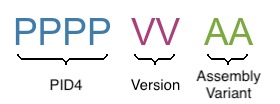
The below table describes the structure of the Product Number (PID8):
| Field | Description |
|---|---|
| PPPP | 4-digits number, indicating the Product Configuration (PID4) that describes the key properties of the product (e.g. Product Group, RAM capacity, etc.) |
| VV | 2-digits number, indicating the Major and Minor Version (in that order) |
| AA | 2-digits number, indicating the Assembly Variant |
See the complete list of available combinations on the Revision History table of the corresponding product page.
Example
Product number (PID8): 00291100:
0029: Apalis iMX6D 512MB
11: Major Version 1, Minor Version 1, Version V1.1 in short
00: Assembly Variant A
A specific product revision has a lifecycle defined by the product state. Learn more about it on the Product Change Notifications.
0217 Lino iMX93 Dual 2GB IT
| Product # | Product Description | Changes from Previous Version | Release Date | Related Documents |
02171000 | Lino iMX93 Dual 2GB IT V1.0A | Initial release
| Q1 2026 | |
02171001 | Lino iMX93 Dual 2GB IT V1.0B |
| Q4 2026 |
Errata/Known Issues
SoC Errata Document
None
SoM Errata Document
None
Hardware Issue Tracker
None
Software Issue Tracker
None